Put any MCP server behind AgentValet
Paste the server’s address or your client’s config. Every tool becomes its own permission, your agents never see the key, and every call is checked and recorded like the rest of your tools.
Today, the key sits in a config file.
Most MCP setups put the server’s token straight into the agent’s config, with every tool switched on. Behind AgentValet, the config holds no key and the agent holds only the tools you chose.
An agent’s MCP configKey in plain text
- Server
- https://mcp.example.com/mcp
- Authorization
- Bearer mcp_4f2c…
- Tools
- Every tool the server has
The same server behind AgentValetKey in the vault
- Server
- Added once for your workspace
- Key
- Encrypted in AgentValet, never sent to the agent
- support-bot may use
- Three tools you picked, nothing else
Illustrations with example data.
Three steps, and the last one happens on every call.
Add the server
Paste the server block from your Claude, Cursor or VS Code config, and AgentValet picks out the address and how it signs in. Or type the URL yourself.
Before anything is saved, AgentValet connects and shows you the server’s tools, so you know exactly what you’re adding. The connection belongs to your workspace, not to one agent.
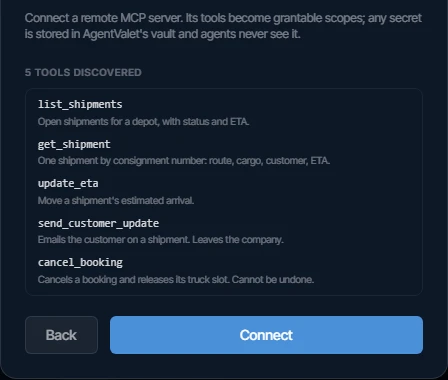
The tools AgentValet found on the server, shown before you connect. A real screen from our demo organisation, using a test server. Decide what each tool may do
Every tool on the server becomes its own permission. Grant an agent only the tools it needs, and anything you don’t grant is refused.
Then set each tool to Allowed, Ask first or Blocked. Here, reading shipments just runs, emailing a customer waits for a person, and cancelling a booking is refused outright.
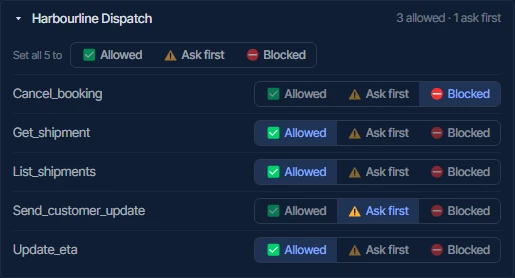
One setting per tool: three allowed, one ask first, one blocked. A real screen from our demo organisation, using a test server. Every call is checked and recorded
A tool call goes through the same checks as a call to Slack or GitHub: the agent’s identity, its grant, your policies and guardrails. If it needs your yes, it waits.
Every decision lands in the audit log with a signed receipt, so you can show which agent called which tool, and who approved it.
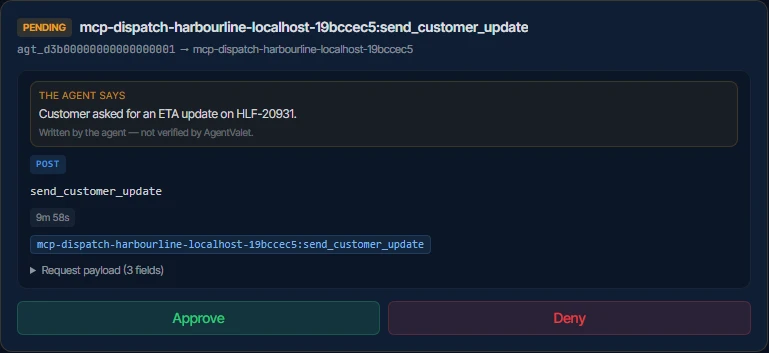
A real call to the Ask first tool, waiting for a person. A real screen from our demo organisation, using a test server.
However the server signs in.
Any remote MCP server that speaks Streamable HTTP. Every plan can add MCP servers. Each server counts as one platform: 3 on Free, 10 on Solo, unlimited on Studio and above.
No sign-in
Public servers.
Bearer token
Pasted once, kept in the vault.
Custom header
Any header name the server expects.
API key in the URL
Stripped from the stored address and added back only on the call.
OAuth
Approve on the provider’s own screen. Tokens refresh by themselves.
What stays true, whichever server it is.
Your agents never see the key.
Tokens, headers and OAuth credentials are encrypted with your organisation’s own key and used only by the broker, for one call at a time.
Adding a server isn’t the same as granting it.
Only admins can add a server, and it does nothing until you grant its tools to an agent.
Guardrails reach MCP tools too.
Tools are tagged read, write or destructive from their names, so an organisation rule like “ask me before anything destructive” applies to them as well.
An unauthorised server asks first.
If an agent reaches for an OAuth server nobody has approved yet, your admins are told, and where the client supports it the consent link appears in the conversation.
Take the keys back this afternoon.
Put one agent through AgentValet on the free plan and watch what it does for a day. If the approvals and the record don’t satisfy you, turn it off. Nothing else about your setup changes.
npx @agentvalet/register